Introduction
Installing Dwarf Therapist alongside a modded version of Dwarf Fortress introduces a specific set of challenges that a clean vanilla installation does not. Mods can alter labor definitions, add new professions, change dwarf attributes, and restructure the underlying data that Dwarf Therapist reads from game memory.
When these changes conflict with what the tool expects to find, the result ranges from minor display issues to a complete failure to connect. Understanding how Dwarf Therapist interacts with mods before you begin the installation process saves significant troubleshooting time later.
The relationship between the tool and the game is built on memory offset mapping, and mods that touch labor, skill, or unit data are most likely to disrupt that mapping.
This guide covers the full installation process for a modded Dwarf Fortress environment, what to check before installing, how to configure the tool for mod compatibility, and how to handle the most common conflicts players encounter.
All guidance is based on community-verified procedures and is intended for informational use.
Quick Facts about How to Install Dwarf Therapist
- Dwarf Therapist reads game memory based on expected data structures, which mods can alter or extend
- Mods that add new labors or professions may not appear correctly in Dwarf Therapist without additional configuration
- The tool itself does not need to be modified to work with most mods, but its labor definition files may need updating
- Version matching between Dwarf Therapist and Dwarf Fortress still applies regardless of which mods are active
- Mods that change core unit data structures carry the highest risk of breaking Dwarf Therapist compatibility
- Dwarf Therapist is not officially supported or endorsed by Bay 12 Games or any mod authors
- Some popular mod packs include community-maintained Dwarf Therapist compatibility patches available separately
- Labor definition files in Dwarf Therapist are plain text and can be edited manually to add mod-introduced labors
- Installing Dwarf Therapist into a modded game does not modify your save files or alter mod behavior
- Always test Dwarf Therapist in a short test fortress before relying on it in a long-term modded playthrough
What Mod Types Affect Dwarf Therapist Compatibility
Labor and Profession Mods
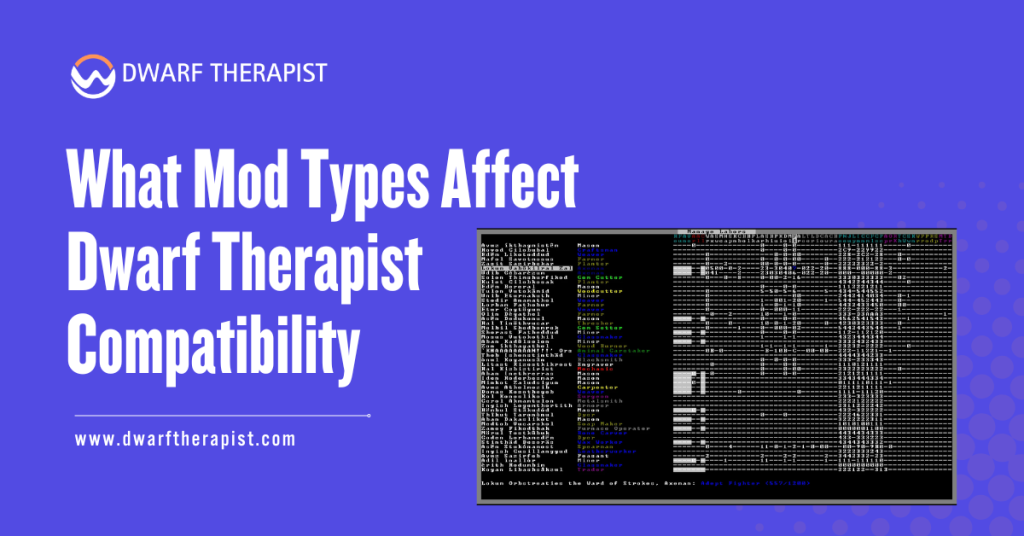
Mods that introduce new labors or redefine existing profession categories are the most directly relevant to Dwarf Therapist functionality. The tool builds its labor grid based on an internal list of expected labor identifiers. When a mod adds labors that fall outside that list, those labors simply do not appear in the Dwarf Therapist interface.
This does not necessarily break the tool entirely. Dwarves will still appear in the roster, and existing vanilla labors will still display and function normally. The gap is that any mod-added labor becomes invisible to the Dwarf Therapist, meaning you cannot assign or track them through the tool.
Mods that rename or reindex existing vanilla labors carry more risk. If a mod reassigns the numeric identifier of a labor that Dwarf Therapist expects at a specific memory position, the tool may display incorrect labor states, showing labors as enabled when they are disabled or vice versa.
Unit Attribute and Skill Mods
Mods that add entirely new skill categories or extend the skill list beyond the vanilla range can cause display anomalies in the skill columns of the Dwarf Therapist grid.
The tool allocates columns based on the expected number of skills, and additions outside that range may display as blank columns, overflow into incorrect positions, or cause the grid layout to shift.
Mods focused purely on graphics, interface improvements, creature additions without new labors, or world generation parameters generally have no impact on Dwarf Therapist at all.
The tool only reads unit-level data, so anything that does not touch how dwarves store their attributes, labors, and skills in memory is effectively invisible to it. Knowing which category your active mods fall into before installing Dwarf Therapist helps you set realistic expectations for what will and will not work without additional configuration steps.
How to Download and Install Dwarf Therapist for a Modded Game
Preparing Your Modded Installation Before Download
Before downloading Dwarf Therapist, take stock of your active mods and identify which ones, if any, introduce new labors, modify existing profession definitions, or alter skill structures.
Mod documentation, typically included in the mod’s readme file or its forum or workshop page, will usually state whether the mod affects labors or skills.
For mod packs with known Dwarf Therapist compatibility work done by the community, search for a Dwarf Therapist patch or compatibility file associated with that specific mod pack.
These are separate downloads that provide updated labor definition files pre-configured for the mod’s additions. Using an existing compatibility patch is always faster than building labor definitions manually from scratch.
Steps to prepare before installing:
- List all active mods and check each for labor, profession, or skill changes in their documentation
- Search the mod’s community page or forum thread for any mentions of Dwarf Therapist compatibility
- Note which mods add new labors so you know what to add to Dwarf Therapist’s labor definitions later
- Confirm your Dwarf Fortress version number so you can match it to the correct Dwarf Therapist release
- Download any available community compatibility patches for your mod pack before proceeding
Downloading and Extracting the Correct Release
Download Dwarf Therapist from the official GitHub repository releases page. Select the release that matches your Dwarf Fortress version exactly, applying the same version-matching requirement that applies to any Dwarf Therapist installation regardless of mod status.
Extract the downloaded archive into a dedicated folder outside your Dwarf Fortress installation directory.
Keeping the tool folder separate from the game folder prevents any accidental interaction between the two directory structures and makes future updates easier to manage.
If you are using a mod pack that has a community-maintained Dwarf Therapist compatibility patch, download that patch as well and keep it ready. You will apply it after the base installation is confirmed working, not before.
- Extract to a clearly named folder such as “DwarfTherapist vXX.X Modded”
- Do not place the folder inside your Dwarf Fortress or Steam game directory
- Keep the original downloaded archive as a backup until the installation is confirmed working
- Do not run Dwarf Therapist yet at this stage; complete configuration before the first launch
Configuring Dwarf Therapist to Work With Your Mods
Applying Compatibility Patches and Labor Definition Updates
If a community compatibility patch exists for your mod pack, apply it now before your first launch. Most patches consist of replacement or additional labor definition files that slot into the Dwarf Therapist folder structure. The patch documentation will specify exactly which files to place where.
Read the patch instructions carefully before copying files. Some patches replace existing default files entirely, while others add supplementary files alongside defaults. Replacing a file you should have kept, or adding a file to the wrong subfolder, are the two most common application mistakes and both produce incorrect labor displays.
If no pre-built compatibility patch exists for your mods, you will need to add mod-introduced labors to Dwarf Therapist’s labor definition files manually.
These files are plain text and can be opened in any text editor. Compare the labor identifiers your mod adds, found in its raw files, against the existing entries in Dwarf Therapist’s labor list, and add matching entries that follow the same formatting pattern as the existing entries.
Testing the Installation Before Your Main Playthrough
Before committing to a long modded playthrough with Dwarf Therapist as part of your workflow, run a short test session in a temporary fortress.
This confirms that the tool connects correctly, displays your mod-added labors if you have configured them, and does not show any obviously incorrect data in the grid.
Common problems and practical solutions in a modded installation:
- Mod-added labors not appearing in the grid These labors need to be added manually to Dwarf Therapist’s labor definition files using the mod’s raw labor identifiers as reference
- Existing labors displaying incorrect states after mod installation A mod has likely reindexed labor identifiers; check the mod’s raw files against Dwarf Therapist’s labor list for numbering conflicts
- Dwarf Therapist fails to connect at all after adding mods Confirm the base game version still matches the Dwarf Therapist release; some mod packs bundle game file changes that shift version identifiers
- Skill columns appear shifted or misaligned A mod has extended the skill list beyond vanilla range; this requires a community patch or manual offset adjustment in the configuration files
- Application crashes when loading a modded save Remove custom labor definition changes temporarily and test with defaults to isolate whether the crash is from a malformed definition file entry
- Dwarves appear in the roster but with scrambled profession names Profession name mapping in Dwarf Therapist may not include mod-added profession identifiers; adding them to the relevant definition file resolves this in most cases
- Labor assignments made in Dwarf Therapist not registering in the modded game Unpause the game briefly after making assignments; also confirm the labor identifiers in your definition files exactly match what the mod uses in its raw files
After confirming basic functionality in the test fortress, load your actual modded save or start your intended playthrough. Monitor the labor grid during the first session for any anomalies that were not present in the test, as longer sessions with more dwarves and more active mod features occasionally surface issues that a short test does not trigger.
Managing Dwarf Therapist Long-Term in a Modded Environment
Handling Mod Updates Alongside Dwarf Therapist Updates
A modded Dwarf Fortress environment introduces two independent update streams that can each break Dwarf Therapist compatibility. Game updates shift memory offsets and require a new Dwarf Therapist release. Mod updates can change labor identifiers, add new labors, or alter skill structures, requiring updates to your Dwarf Therapist configuration files.
When either the game or a mod updates, treat it as a potential compatibility event. Check the mod’s update notes for any mention of labor or skill changes before resuming your session with Dwarf Therapist active. Even a mod update described as a balance or content patch can include labor additions that silently break your labor definition configuration.
Keeping a dated backup of your Dwarf Therapist configuration files before any update, whether it is the game, the tool, or a mod, gives you a reliable restoration point if something breaks.
The backup process takes under a minute and eliminates the risk of losing your custom labor definitions to an update that changes a file you had carefully edited.
When to Run Without Dwarf Therapist in a Modded Game
Some mod combinations, particularly large overhaul packs that extensively restructure labor and skill systems, may not reach a stable Dwarf Therapist compatibility state within a reasonable timeframe.
In these cases, the most practical decision is to manage labors through the native in-game tools for that playthrough rather than investing ongoing effort in maintaining a partially functional Dwarf Therapist configuration.
The native in-game labor management tools are always fully compatible with whatever version of the game and mods you are running. They do not require any external configuration, version matching, or maintenance of definition files.
Players running heavily modded installations should evaluate honestly whether the time spent maintaining Dwarf Therapist compatibility for a specific mod combination is returning enough value to justify the overhead compared to simply using the in-game tools for that particular playthrough.
Frequently Asked Questions
Does installing Dwarf Therapist affect how mods function in Dwarf Fortress?
No. Dwarf Therapist reads game memory and does not write to game files, save files, or mod files. Its presence has no effect on how mods behave within the game itself.
Will Dwarf Therapist show mod-added labors automatically?
Not automatically. Mod-added labors must be added to Dwarf Therapist’s labor definition files manually, or a community compatibility patch for your mod pack must be applied. Without this step, mod-added labors will not appear in the grid.
Where do I find community compatibility patches for Dwarf Therapist and specific mods?
Check the mod’s original forum thread, Steam Workshop page, or community discussion board. Some mod authors or community members maintain separate compatibility files linked directly from the mod’s main page.
Can I use Dwarf Therapist with a mod manager like DFHack?
DFHack is a separate modding framework that also reads and modifies game memory. Running both DFHack and Dwarf Therapist simultaneously is a documented practice in the community and generally works, but conflicts can occur depending on which DFHack plugins are active. Test this combination in a short session before relying on it in a long playthrough.
What happens if a mod update changes labor identifiers I already configured in Dwarf Therapist?
Your existing labor definition entries for those labors will become misaligned. Symptoms include incorrect labor states or labors pointing to the wrong assignments. Update your Dwarf Therapist labor definition files to reflect the new identifiers the mod is now using.
Is there a way to automatically sync Dwarf Therapist labor definitions with mod raw files?
No built-in automatic sync exists. Labor definitions must be added or updated manually by editing the configuration files. Some community tools and scripts have been developed to assist with this, but none are officially part of Dwarf Therapist itself.
Can I install Dwarf Therapist mid-playthrough in a modded game?
Yes. Dwarf Therapist does not modify your save files, so installing and connecting it to an existing modded playthrough carries no risk to your fortress data. Configure your labor definitions before your first session to avoid seeing an incomplete labor grid.
Should I update Dwarf Therapist and my mods at the same time?
Updating them separately is safer. Update Dwarf Therapist first, confirm it connects correctly with your current mod setup, and then update your mods. Updating both simultaneously makes it harder to isolate which change caused a problem if something breaks.
Latest Post:
- How Dwarf Therapist Works (Labors, Skills & Assignments Explained)
- Dwarf Therapist Supported Versions (Steam & Classic)
- Dwarf Therapist Features You Should Know (Reports, Filters, Profiles)
- Is Dwarf Therapist Safe? Security, Mods & Stable Downloads
- Dwarf Therapist vs In‑Game Manager Tools (Pros & Cons)