Introduction
Dwarf Therapist is most commonly used for broad labor setup, but its real power emerges when applied to production workflows. Matching the right dwarves to the right workshop roles, at the right population scale, is what separates a functional fortress from an efficient one.
This guide covers how to use Dwarf Therapist specifically to optimize work orders, reduce production bottlenecks, and maintain consistent output across all workshop types.
Quick Facts How to Optimize Work Orders Using Dwarf Therapist
- Work order optimization in Dwarf Therapist refers to aligning labor assignments with active production queues to eliminate idle time and skill waste
- Dwarf Therapist does not create work orders directly but controls which dwarves are eligible to fulfill them through precise labor toggling
- Misaligned labor assignments are the leading cause of stalled workshops and unfulfilled production queues in Dwarf Fortress
- Who it is for: Players managing active production fortresses who want consistent output from workshops without micromanaging each dwarf individually
- Who should avoid it: Players using the vanilla Dwarf Fortress labor system exclusively may find cross-tool workflows confusing without prior Dwarf Therapist familiarity
- Skill-matched labor assignments directly improve the speed and quality of work order completion
- Key risk: Enabling too many dwarves for a single workshop labor causes job competition, slowing overall production throughput
- Work order optimization works best when combined with manager-level job assignments inside Dwarf Fortress itself
- Always confirm your Dwarf Therapist version is compatible with your active Dwarf Fortress build before making bulk labor changes
What Is Work Order Optimization in Dwarf Therapist
Labor Assignments and Work Orders
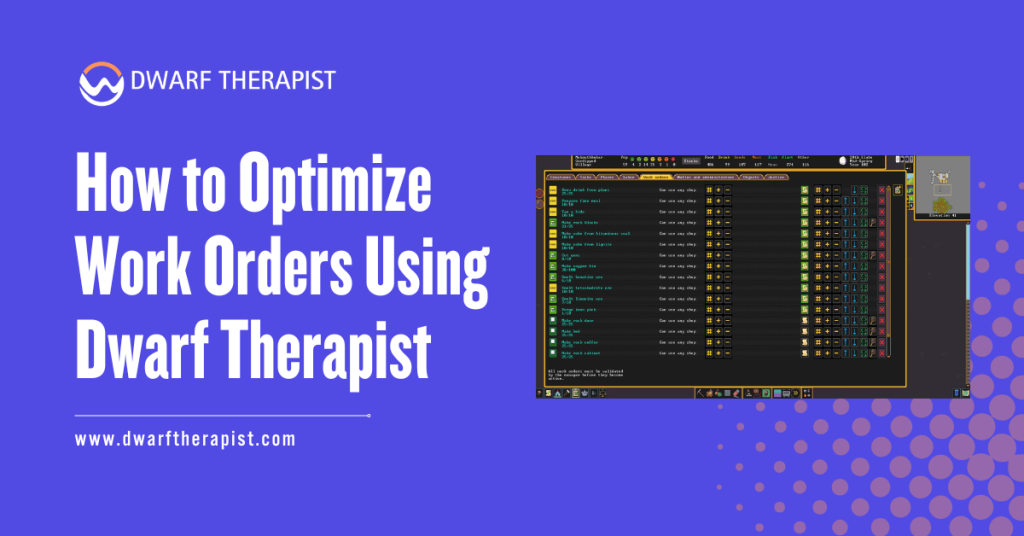
Work orders in Dwarf Fortress are instructions issued through the manager interface. They tell the game to produce a set quantity of a specific item. However, the game only assigns a dwarf to fulfill a work order if that dwarf has the corresponding labor enabled.
Dwarf Therapist controls labor enabling and disabling. This means it directly determines which dwarves are eligible to pick up any given work order. If labor assignments are too broad, unqualified dwarves compete for jobs they perform slowly. If assignments are too narrow, work orders queue without being claimed.
Optimization through Dwarf Therapist means calibrating exactly how many dwarves have each workshop labor enabled, and ensuring those dwarves have the skill levels that match the quality and speed your production requires.
Why Default Labor States Cause Production Inefficiency
New dwarves arrive with a mix of default labor states that rarely align with fortress production needs. Some arrive with labors enabled that directly conflict with your active work orders. Others have valuable skills that go unused because the corresponding labor was never activated.
The base game interface makes it time-consuming to audit and correct these states across large populations.
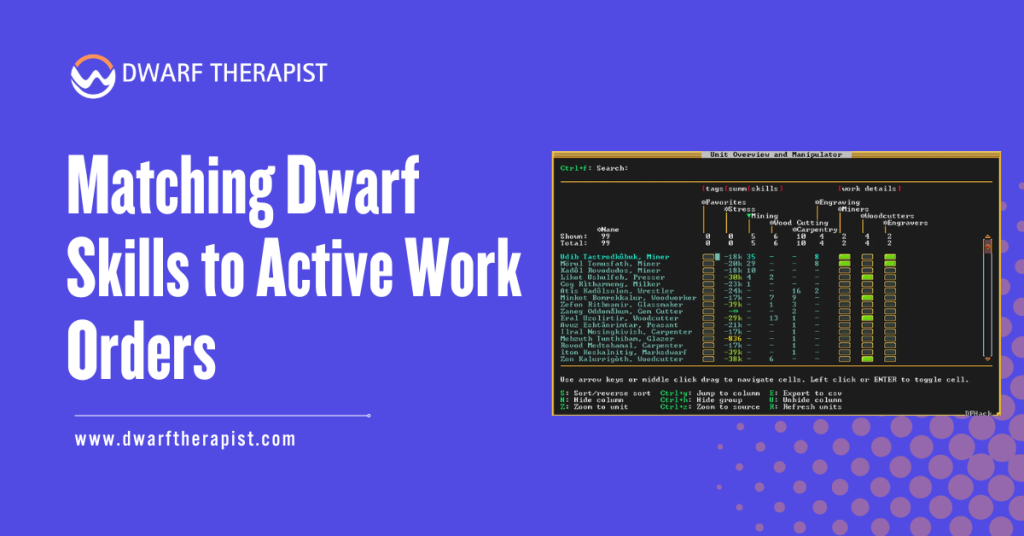
Dwarf Therapist solves this by presenting every dwarf and every labor in a single scrollable grid, making mismatches immediately visible.
Without active management through a tool like Dwarf Therapist, most fortresses develop labor bloat. Too many dwarves share too many labors, causing constant job interruptions, skill stagnation, and workshop queues that process slower than they should.
Common Problems and Solutions:
- Work orders not being claimed: Check that at least one dwarf has the relevant labor enabled and is not currently occupied with a higher-priority task
- Slow production despite active workers: Too many dwarves sharing the labor dilutes focus and increases job competition delays
- Skilled craftsdwarf ignoring workshop: Confirm the specific workshop labor is enabled, not just a related category
- Work order completing at low quality: The assigned dwarf lacks sufficient skill. Enable the labor only for higher-skilled dwarves
- Production halting after migrant wave: New dwarves may have overridden existing labor balances. Audit and reapply role profiles after each wave
Setting Up Dwarf Therapist for Work Order Management
Organizing the Labor Grid for Production Visibility
Before optimizing any work order, configure Dwarf Therapist’s column layout to display only production-relevant labors. Remove hauling, cleaning, and social labors from view temporarily. This narrows your focus to workshop-critical assignments.
Enable the skill overlay on all visible columns. The overlay uses color-coding to show each dwarf’s aptitude level for each displayed labor.
This allows you to identify at a glance which dwarves are genuinely skilled in a labor versus which ones merely have it enabled.
Sort dwarves by skill level within a specific labor column when preparing to assign workshop roles. This surfaces your most capable workers immediately and allows you to build efficient specialist assignments without individually reviewing every dwarf.
Using Filters to Isolate Workshop Workers
Dwarf Therapist’s filter system allows you to create persistent views that show only specific subsets of your population. Create a named filter for each major workshop category: stone crafting, metalworking, the wood industry, food production, and textile work.
These filtered views let you manage each production area independently without being distracted by unrelated labors or worker groups. When a work order stalls, load the relevant filter and immediately see which dwarves are assigned, how skilled they are, and whether conflicts exist.
Filters also reduce the risk of accidental labor changes. When only the relevant dwarves and labors are visible, the chance of toggling the wrong assignment during a fast-paced session drops significantly.
| Workshop Type | Recommended Assigned Workers | Skill Priority | Labor Conflicts to Avoid |
| Forge and Smelter | 1 to 2 specialists | Metalsmithing, Smelting | Mining, Hauling |
| Carpenter Workshop | 1 to 3 workers | Carpentry, Wood Cutting | Farming, Cooking |
| Kitchen and Still | 1 to 2 per station | Cooking, Brewing | Construction, Mining |
| Mason Workshop | 2 to 4 workers | Masonry, Engraving | Hauling, Woodcutting |
| Clothier and Loom | 1 to 2 specialists | Weaving, Spinning | Stone, Metal labors |
Matching Dwarf Skills to Active Work Orders
Reading Skill Data to Assign the Right Workers
The skill overlay in Dwarf Therapist provides aptitude ratings for every dwarf across every labor. These ratings range from no skill through novice, competent, skilled, proficient, expert, and master levels. Higher skill means faster task completion and better output quality.
When a work order requires quality output, such as decorated furniture, trade goods, or military equipment, enable that workshop labor exclusively for dwarves rated at skilled level or above.
Disable it for lower-skilled dwarves entirely to prevent them from claiming the job and producing inferior results.
For bulk production work orders where quality is secondary, such as producing rock crafts for trade, a wider skill range is acceptable. Enable the labor across several dwarves to increase throughput speed without quality concerns.
Balancing Specialist Depth Against Workforce Flexibility
Pure specialist assignment produces the fastest, highest quality work in any single workshop. However, a fortress relying entirely on specialists becomes fragile. If a specialist dwarf is injured, on a mood, or attending a party, that workshop halts entirely.
Dwarf Therapist allows you to designate a primary specialist and one backup worker per critical workshop. The backup has labor enabled but is assigned a lower priority due to reduced labor enablement elsewhere. This maintains production continuity without creating the job competition that comes from broad labor assignment.
Guidelines for specialist depth by fortress stage:
- Early game (under 30 dwarves): Use hybrid workers covering two to three related labors each
- Mid game (30 to 80 dwarves): Begin transitioning to primary specialists with single backup coverage
- Late game (80 plus dwarves): Full specialization with dedicated backup dwarves per workshop category
- Crisis situations: Temporarily broaden labors using Dwarf Therapist to redistribute workforce quickly
Advanced Optimization Techniques for High-Output Fortresses
Rotating Labor Assignments With Seasonal Production Goals
Fortress production needs shift across seasons. Early autumn demands food stockpiling. Winter requires fuel and material preparation. Spring brings construction and expansion. Summer supports military preparation and trade.
Dwarf Therapist makes it practical to rotate labor assignments in line with these seasonal cycles. Build season-specific profile variants for key roles. A farmer profile for growing season enables plant gathering and food processing alongside farming. An off-season variant redistributes that dwarf toward construction or crafting labors.
Applying these rotations takes under two minutes with saved profiles. The production benefit over a full in-game year significantly outpaces the time investment required to set up the profile variants.
Using Dwarf Therapist Alongside the Fortress Manager
Dwarf Therapist and the in-game manager work best as complementary systems. The manager issues work orders. Dwarf Therapist ensures the right dwarves are eligible to fulfill them. Neither system alone achieves the same result as both used in coordination.
Set recurring work orders through the manager for items your fortress always needs: bins, barrels, food, clothing, and basic furniture. Then use Dwarf Therapist to confirm that exactly the right number of skilled dwarves have those labors active.
Periodically cross-reference your active manager queue with your Dwarf Therapist labor grid. If a work order has been queued for multiple seasons without completion, it almost always indicates a labor assignment gap that Dwarf Therapist can resolve in seconds.
Optimization checklist for active production fortresses:
- Audit labor assignments after every migrant wave
- Confirm specialist labors are disabled on non-specialist dwarves
- Review stalled work orders against skill overlay data
- Rotate seasonal profiles at the start of each new in-game season
- Never assign more than three dwarves to the same single workshop labor without a volume-justified reason
- Keep backup worker assignments documented in a consistent profile naming system
This guide reflects practical, community-informed methodology developed through documented use of Dwarf Therapist across multiple Dwarf Fortress versions and population scales.
All recommendations are based on demonstrated in-game mechanics and workflow principles.
Frequently Asked Questions
Does Dwarf Therapist directly control work orders in Dwarf Fortress?
No. Dwarf Therapist manages labor assignments, which determine dwarf eligibility for work orders. Work orders themselves are created and managed through the in-game manager interface. The two systems work together rather than one replacing the other.
How many dwarves should I assign to a single workshop labor?
For most specialist workshops, one to two dwarves is optimal. High-volume production workshops such as mason or carpenter workshops can support three to four. Assigning more creates job competition that slows rather than accelerates output.
Why is my skilled craftsdwarf not fulfilling work orders?
The most common cause is a conflicting higher-priority labor being active. Dwarf Therapist allows you to disable competing labors so the dwarf focuses on workshop tasks. Also confirm the specific labor tied to that workshop is enabled, not just a broad category.
Can I undo bulk labor changes made through Dwarf Therapist?
Not automatically. This is why backing up your save file before making bulk changes is strongly recommended. You can manually reverse changes using Dwarf Therapist but this requires re-auditing each affected dwarf individually.
What is the best way to handle work orders during a large migrant wave?
Apply saved role profiles to new migrants immediately after the wave. Audit the skill overlay to confirm assignments match aptitudes. Check that specialist labors remain restricted to your designated specialists and were not accidentally enabled on new arrivals.
Does optimizing labors in Dwarf Therapist affect dwarf happiness?
Indirectly yes. Dwarves assigned to labors that match their skills complete jobs faster, gain skill experience, and experience fewer frustrating interruptions. This contributes positively to overall mood. Dwarves forced into mismatched labors develop skills slowly and may grow unhappy over time.
How often should I review labor assignments in Dwarf Therapist?
A full audit after every migrant wave and at the start of each new season is a reliable baseline. For active high-production fortresses, a brief review every five to ten in-game days during peak production periods helps catch assignment drift before it stalls output.
Is there a risk of game instability from frequent Dwarf Therapist use?
Dwarf Therapist interacts with game memory. Frequent use is generally stable when using a correctly version-matched build. The primary risk is using a mismatched version, which can cause read errors or incorrect labor states. Always verify version compatibility before each new Dwarf Fortress update.
Latest Post:
- Domain WHOIS: A Complete Guide to Domain Registration Information
- How Dwarf Therapist Works (Labors, Skills & Assignments Explained)
- Dwarf Therapist Supported Versions (Steam & Classic)
- Dwarf Therapist Features You Should Know (Reports, Filters, Profiles)
- Is Dwarf Therapist Safe? Security, Mods & Stable Downloads